Introduction
A spatial index is a data structure that’s designed to quickly find all elements that intersect with a given query shape. The word index is used in the database sense; not as an integer identifier.
Here quick means, that we do not need to look through all element to figure out which elements intersect with the query shape. In brain-indexer we use an implementation of an R-tree, see boost::rtree. The idea behind an R-tree is that the leaves of the tree contain the bounding boxes of the elements; and internal nodes store the bounding box of their descendants. This structure is depicted in Fig. 1.
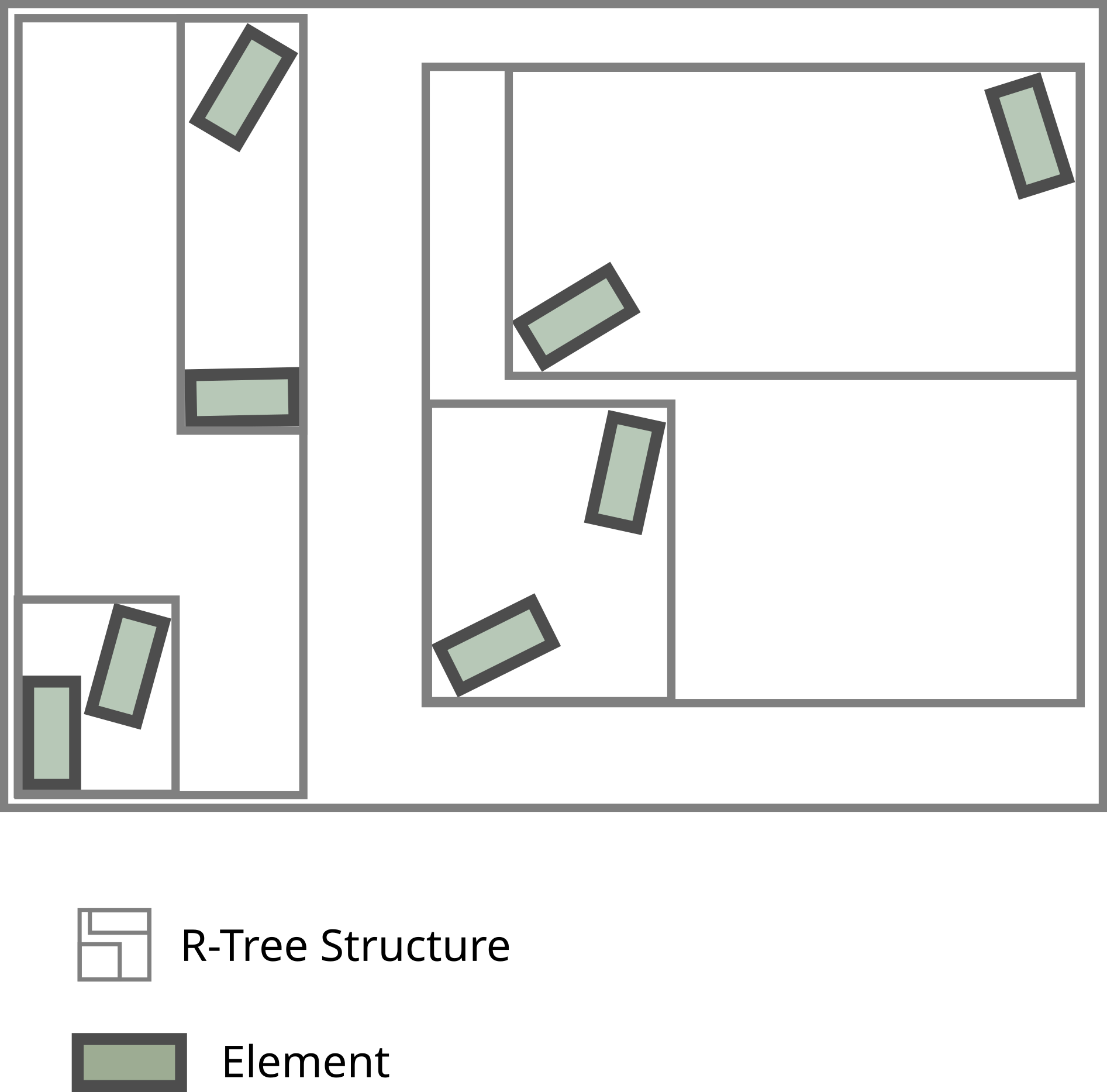
Fig. 1 The gray non-axis aligned boxes are represent the elements in the tree. The gray outlines represent the bounding box of internal nodes.
Given such a tree, when performing the query one only needs to descend into subtrees, if they query shape intersects with the bounding box of the subtree. By design this piece of information is stored in the root of the subtree. This is show in Fig. 2.
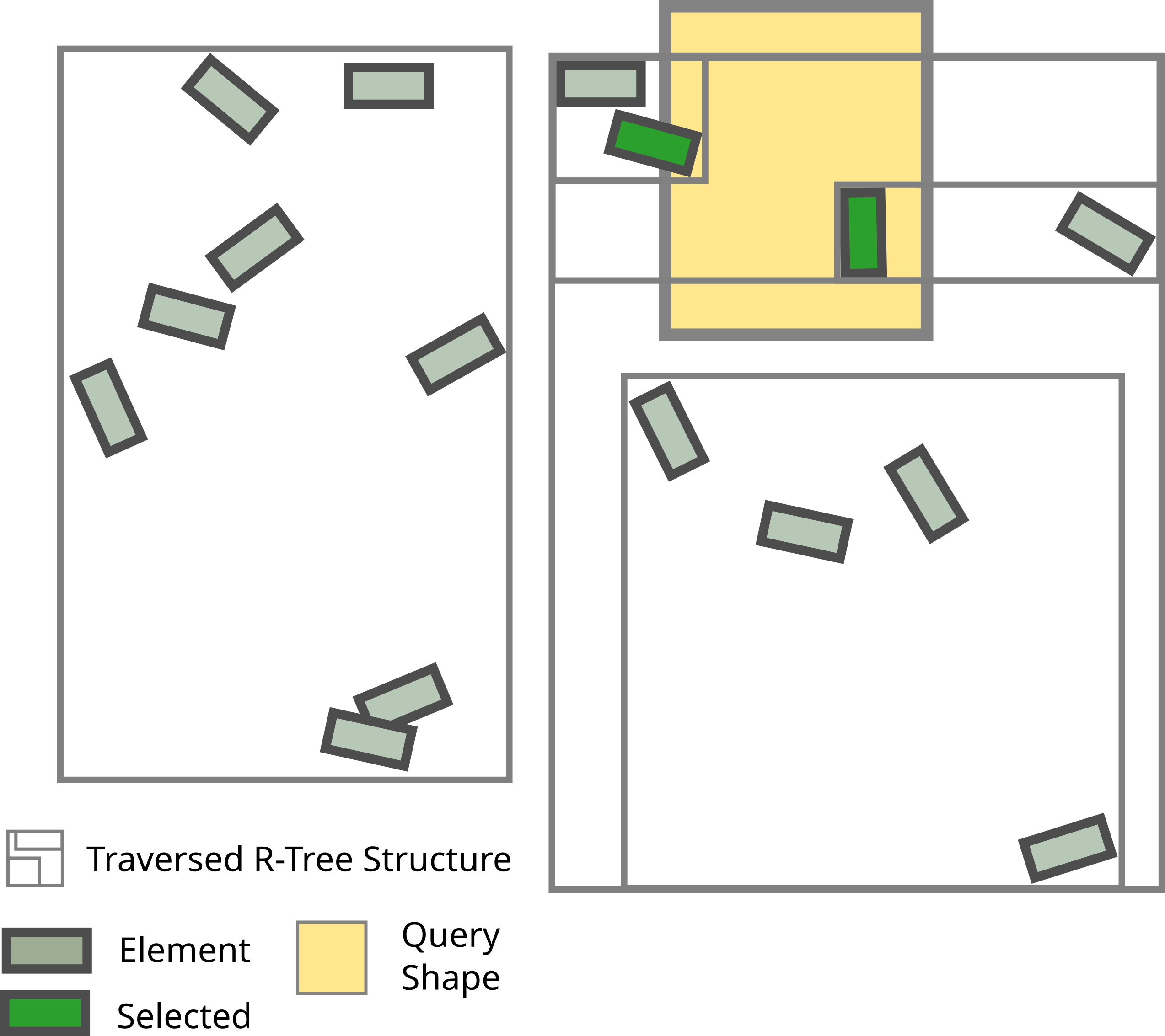
Fig. 2 The yellow box is the query shape. The elements found by this query are shown in green, any other elements are drawn in gray. The outlines show which parts of the tree need to be considered when performing a query. In the first level the entire left side is excluded, then the lower half. In the third level, both subtrees need to be looked at.
The trick is to create the tree such that the bounding boxes of internal nodes don’t overlap too much or needlessly.
One typical work flow for indexes is to create them once up front, store them and open them whenever one needs to perform spatial queries. Naturally, there are other workflows which will also be covered, but for now it’s enough to know that the cost of building the index is often less than the naive approach. Even for few elements and not very many queries, say thousands.
Because it’s common (at BBP) that someone has precomputed the index for you, we start explaining the syntax of queries.
Using Existing Indexes
If you prefer a hands-on approach you might like to continue with the Jupyter
Notebook basic_tutorial.ipynb or any of the examples in examples/.
Given an index stored at index_path, one may want to open the index and
perform queries.
Opening An Existing Index
Indexes are usually stored in their own folder. This folder contains a file called meta_data.json.
In order to open an index one may simply call
index = brain_indexer.open_index(path_to_index)
where path_to_index is the path to the folder containing the index. This can be used for all
variants of indexes.
Performing Simple Queries
After opening the index one may query it as follows:
results = index.box_query(min_points, max_points)
results = index.sphere_query(center, radius)
The former returns all elements that intersect with the box defined by the
corners min_points and max_points. The latter is used when the query
shape is a sphere. The detailed documentation of queries contains several
examples.
Creating An Index on the Fly
Workflows that require repeated queries will benefit from using a spatial index, even for quite a small number of indexed elements. Therefore, it is useful to create small indexes on the fly. This section describes the available API for this task.
If you’re trying to pre-compute an index for later use, you might prefer the CLI applications.
Indexing Nodes
A common case is to create a spatial index of spheres which have an id (e.g. somas identified by their gid). SphereIndex is, in this case, the most appropriate class.
The constructor accepts all the components (gids, points, and radii) as individual numpy arrays.
from brain_indexer import SphereIndexBuilder
import numpy as np
ids = np.arange(3, dtype=np.intp)
centroids = np.array([[0, 0, 0], [1, 0, 0], [2, 0, 0]], dtype=np.float32)
radius = np.ones(3, dtype=np.float32)
index = SphereIndexBuilder.from_numpy(centroids, radius, ids)
Indexing Morphologies
In brain-indexer the term morphologies refers to discrete neurons consisting of somas and segments.
Morphology indexes can be build directly from SONATA input files. For example by using MorphIndexBuilder as follows:
index = MorphIndexBuilder.from_sonata_file(morph_dir, nodes_h5)
where morph_dir is the path of the directory containing the morphologies in
either ASCII, SWC or HDF5 format. Both function have a keyword argument which
allows one to optionally specify the GIDs of all neurons to be indexed.
By passing the keyword argument output_dir the index is stored at the
specified location and can be opened/reused at later point in time.
Indexing Synapses
Another common example is to create a spatial index of synapses imported from a sonata file.
In this case SynapseIndexBuilder is the appropriate class to use:
from brain_indexer import SynapseIndexBuilder
from libsonata import Selection
index = SynapseIndexBuilder.from_sonata_file(EDGE_FILE, "All")
Building a synapse index through this API enables queries to fetch any attributes of the synapse stored in the SONATA file. Please see Queries for more information about how to perform queries.
Passing the keyword argument output_dir ensures that the index is also
stored to disk.
Precomputing Indexes For Later Use
When the number of indexed elements is large, considerable resources are needed to compute the index. Therefore, it can make sense to precompute the index once and store it for later (frequent) reuse. The most conventient way is through the CLI applications. Note that indexes can exceed the amount of available RAM, in this case please consult Large Indexes.
Command Line Interface
There are three executables
brain-indexer-circuitis convenient for indexing both segments and synpses when the circuit is defined in a SONATA circuit configuration file. Therefore, if you already have a circuit config files, this is the right command to use.$ brain-indexer-circuit --help The C++ backend of BrainIndexer was compiled without MPI support. Therefore multi-index builders have been disabled. This could be because you're using a wheel, which (currently) don't support MPI. If you need to create a big index you'll need to use multi-indexes and therefore a version built with MPI. Please install using Spack or directly from source. brain-indexer-circuit Create an index for the circuit defined by a SONATA circuit config. The index can either be a segment index or a synapse index. The segment index expects the SONATA config to provide: components/morphologies_dir networks/nodes For a synapse index we expect the SONATA config to provide networks/edges Multiple populations are supported through the flag `--populations`. When indexing multiple populations, one must list all populations to be indexed. When indexing a single population, one may omit `--populations` if the population is unique. Note: requires libsonata Usage: brain-indexer-circuit segments <circuit-file> [options] [(--populations <populations>) [<populations>...]] brain-indexer-circuit synapses <circuit-file> [options] [(--populations <populations>) [<populations>...]] brain-indexer-circuit --help Options: -v, --verbose Increase verbosity level. -o, --out=<out_file> The index output folder. [default: out] --multi-index Whether to create a multi-index. --progress-bar Enable the progress bar.brain-indexer-nodesis convenient for indexing segments if one wants to specify the paths of the input files directly.$ brain-indexer-nodes --help The C++ backend of BrainIndexer was compiled without MPI support. Therefore multi-index builders have been disabled. This could be because you're using a wheel, which (currently) don't support MPI. If you need to create a big index you'll need to use multi-indexes and therefore a version built with MPI. Please install using Spack or directly from source. brain-indexer-nodes Usage: brain-indexer-nodes [options] <nodes-file> <morphology-dir> brain-indexer-nodes --help Options: -v, --verbose Increase verbosity level. -o, --out=<folder> The index output folder. [default: out] --multi-index Whether to create a multi-index. --population <population> The population to index. --progress-bar Enable the progress bar.brain-indexer-synapseslikebrain-indexer-nodesbut for synapses.$ brain-indexer-synapses --help The C++ backend of BrainIndexer was compiled without MPI support. Therefore multi-index builders have been disabled. This could be because you're using a wheel, which (currently) don't support MPI. If you need to create a big index you'll need to use multi-indexes and therefore a version built with MPI. Please install using Spack or directly from source. brain-indexer-synapses Usage: brain-indexer-synapses [options] <edges_file> brain-indexer-synapses --help Options: -v, --verbose Increase verbosity level. -o, --out=<folder> The index output folder. [default: out] --multi-index Whether to create a multi-index. --population <population> The population to index. --progress-bar Enable the progress bar.
Large Indexes
brain-indexer implements Multi-Indexing for indexing large circuits.
Multi indexes subdivide the volume to be indexed into small subvolumes and uses MPI to create subindexes for each of these subvolumes. More information can be found here.