Multi Index
A multi-index is a hierarchy of regular indexes. The flavour of spatial index used by brain-indexer is an R-tree. An R-tree is a tree and every internal node stores the combined bounding box of all its descendants. The leaves of the tree are the segments, somas or synapses. Therefore, one can imagine cutting the tree at a certain depth and storing each subtree individually. This isn’t quite how the multi-index is implemented. Instead we first compute non-overlapping volumes such that each area contains roughly the same number of elements. More precisely the volumes contain the same number of centers of the elements. The algorithm used is called Sort Tile Recursion (STR), see Fig. 6.
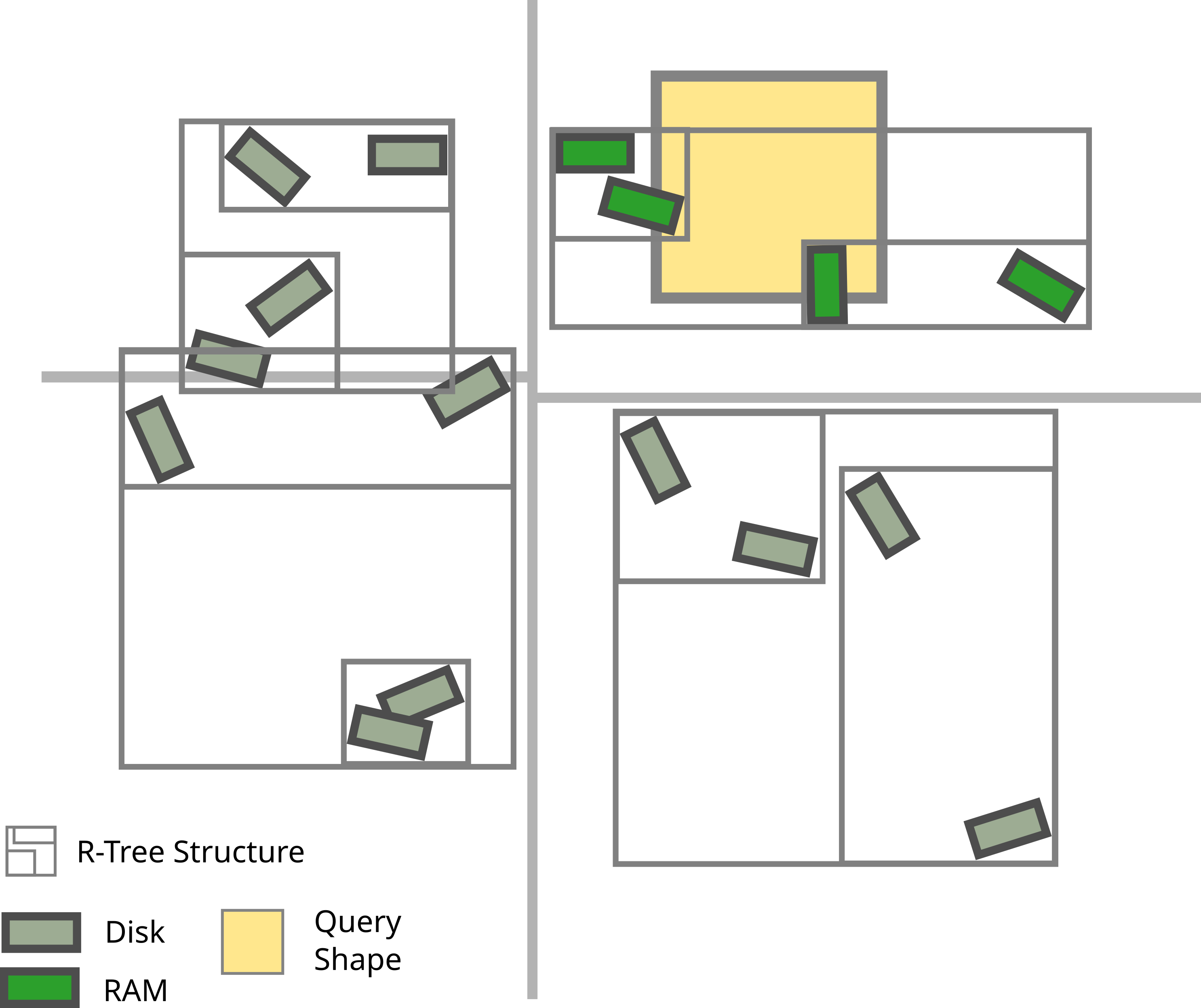
Fig. 6 The non-axis aligned boxes represent the elements in the tree. The gray outlines represent the lowest three levels of the tree. The thick light-gray lines represent the two steps of the STR. First a vertical separator is selected. Then two separate horizontal separators are computed. The yellow box shows the first query performed after opening the index. Only the elements in green need to be loaded into RAM.
There are two advantages to using a multi-index:
it can be built in parallel, which leads to very substantial savings in runtime,
when opening a multi-index one only needs to load the upper most tree. Loading subtrees can be delayed until a query needs to process the subtree. For efficiency sake, subtrees are cached.
Creating a Multi Index
As stated earlier creating a multi-index is done in parallel using MPI. There
are examples of the script needed to create a multi-index (essentially a few
paths and one line to create the multi-index). They can be found in the
examples/ folder.
On BB5 you’ll can run MPI parallel jobs as follows:
# Using SBATCH scripts:
sbatch --ntasks N --mem-per-cpu MEM --account=ACCOUNT --partition=prod SCRIPT

# Interactive equivalent:
srun --ntasks N --mem-per-cpu MEM --account=ACCOUNT --partition=prod SPATIAL_INDEX_COMMAND
the value of N (number of MPI ranks) and MEM (memory per MPI rank)
depend on the size of the circuit. The important resource is the total amount
of RAM. There are two ways of increasing the total amount of RAM:
either by changing
N;or by changing
MEM.
The total amount of RAM is (approximately) N * MEM. Currently, N must
be of the form 2**n * 3**m * 5**l + 1. For MEM probably only the values
2G, 4G and 8G make sense. Given that each node of the cluster has
roughly 360GB of RAM and 40 physical cores, each node can support up to 80 MPI
ranks (through hyper-threading) with 4GB of RAM each. Therefore, when using
less than 4GB per rank, not the entire available RAM on each node can be used.
Hence, values below 2G are likely an inefficient use of the cluster (unless
measurements say otherwise).
The following table contains a values for N and MEM for selected
circuits, along with a rough measurment of the runtime. Note that the
performance, especially for large circuits is quite sensitive to how busy GPFS
is.
For morphology indexes the following values are known to work on BB5:
Circuit Name |
#cells |
N |
MEM |
runtime |
|---|---|---|---|---|
circuit-1k |
1k |
5 |
1G |
30s |
circuit-10k |
10k |
5 |
4G |
4min |
circuit-100k |
100k |
129 |
4G |
3min |
circuit-1M |
1M |
513 |
4G |
6min |
SSCx |
4.2M |
2049 |
4G |
8min |
For synapse indexes the following values are known to work on BB5:
Circuit Name |
#edges |
N |
MEM |
runtime |
|---|---|---|---|---|
RAT SSCx |
9.1G |
513 |
4G |
5min |
Querying a Multi Index
When querying a multi index only a single core is needed. The multi-index
will only load those subtrees that are required by the query and store the
subtrees in a cache. To avoid out-of-memory issues, the cache needs to be
told how much memory it’s allowed to consume. Since, loading new subtrees is
expensive compared to a query, it’s beneficial to ask for as much memory as
needed by the workflow. A multi index will create a log file
si_cache_stats_*.json containing information about which subtrees where
loaded, how often they were used and most importantly how often each subtree
was evicted. If you see high eviction number >2 and perceive the querying
to be slow you should try increase the size of the cache. On BB5 up to about
300GB. If this doesn’t help and the log file shows unsatisfactory cache
utilization, please report the issue through JIRA.
MPI Tips for Constructing Multi Indexes
This selection collects common patters for creating multi-indexes by using the Python API (as opposed to the CLI). If you discover a useful pattern you want to have documented for others, please let us know.
Synapse Indexes for Target GIDs
brain-indexer allows building multi-indexes only of those synapses which have a target GID from a user specified list.
In order to save memory, it can be useful to construct this list only on one MPI rank, and let SI deal with distributing them.
from mpi4py import MPI
from brain_indexer import SynapseMultiIndexBuilder

comm = MPI.COMM_WORLD
rank = comm.Get_rank()

def compute_target_gids():
    # The scientific details about selecting the
    # target GIDs would go here.
    return target_gids

if rank == SynapseMultiIndexBuilder.constructor_rank(comm):
    target_gids = compute_target_gids()
else:
    target_gids = None

SynapseMutliIndexBuilder.from_sonata_file(
    edges_file, target_gids, output_dir=output_dir
)